
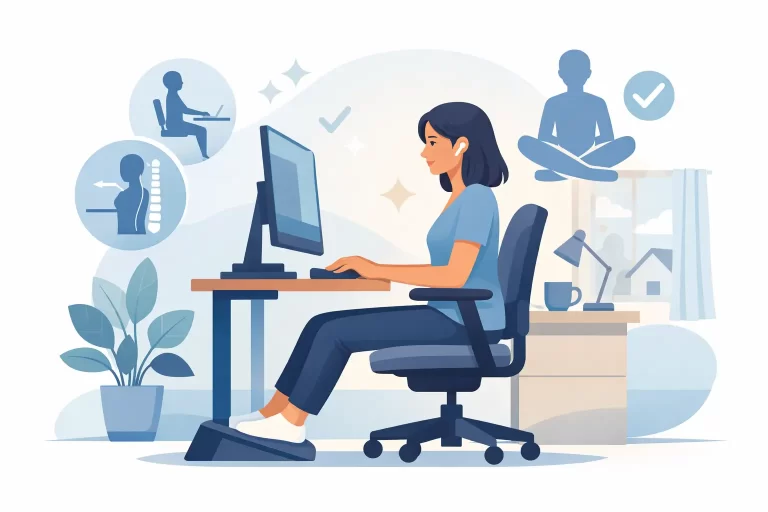
By 10 a.m., many people working at home have already slipped from upright and supported to folded over a laptop, shoulders creeping forward, chin jutting out, lower back doing far too much work. Work from home posture often starts with good intentions and slowly unravels as emails pile up, kids need something, and the kitchen table becomes an office for the third day in a row.
The good news is that posture is not about holding yourself stiff all day or chasing a perfect position that your body cannot sustain. Healthy posture is really about support, variety, and awareness. When your workspace helps your spine stay in a more balanced position, your muscles do less compensating, your nervous system faces less physical stress, and your body can move through the day with more ease.
Why work from home posture gets worse at home
A traditional office is not always ideal, but home setups tend to introduce a different kind of strain. Many people work from laptops, low tables, soft couches, or dining chairs that were never meant for six to eight hours of sitting. Even a very motivated person can struggle if the screen is too low, the chair is too deep, or the feet cannot rest comfortably.
There is also a hidden factor – home life blends into work life. In an office, you may walk to meetings, visit a colleague, or step out for lunch. At home, it is easy to stay in one position for long stretches without realizing it. The issue is not just posture itself. It is posture plus time.
That is why two people can use the same setup and feel very different. One may shift often, stand up regularly, and finish the day feeling fine. The other may stay frozen in one position and notice neck tension, headaches, mid-back tightness, hip stiffness, or tingling through the arms. Posture is shaped by your workstation, your habits, your stress level, and your body’s current level of resilience.
What good work from home posture really looks like
Instead of aiming for rigid posture, aim for a position that lets your body stack more naturally. Your ears should sit roughly over your shoulders, and your shoulders should rest more comfortably over your ribcage rather than rolling forward. Your lower back should have gentle support, your feet should feel grounded, and your elbows should stay close to your sides instead of reaching out and up.
If that sounds simple, it is. The challenge is that small mismatches add up quickly. A screen that is just a little too low can pull your head forward for hours. A chair that is just a little too high can leave your feet dangling and your hips tense. A keyboard that is too far away can make your upper back and neck work harder than they need to.
There is no single perfect posture for every body. Pregnancy, hypermobility, previous injuries, height, and even where you hold stress can all change what feels supportive. The goal is not to force yourself into a textbook position. The goal is to create a setup that reduces unnecessary strain and allows for movement throughout the day.
Set up your desk to support your spine
The biggest improvement usually comes from adjusting the screen first. Your monitor should be at or close to eye level so you are not constantly looking down. If you work from a laptop, raising it on a stand or even a stable stack of books can help, but you will also need an external keyboard and mouse. Without them, you simply trade one problem for another.
Your chair matters too, but it does not need to be fancy. What matters is that it supports your pelvis and lower back well enough for you to sit without collapsing. If your chair is too deep, place a small cushion behind your lower back. If your feet do not reach the floor comfortably, use a footrest or a sturdy box.
Keep your keyboard close enough that your elbows can bend comfortably near your sides. Your wrists should not be cranked upward for long periods. If you use a mouse often, keep it close as well. Reaching out repeatedly may seem minor, but over time it can contribute to shoulder and upper back tension.
Lighting is another piece people miss. If the screen is hard to see, you will lean in without thinking. Good lighting supports better positioning because your body does not have to chase the screen.
The posture problem is often a movement problem
Even excellent work from home posture will start to feel uncomfortable if you hold it too long. The spine is designed to move. Muscles, joints, and connective tissues all benefit from regular position changes, not just one ideal seated shape.
A helpful rhythm is to interrupt sitting every 30 to 45 minutes, even briefly. Stand up, walk to refill your water, roll your shoulders, reach overhead, or take a few slow breaths while changing positions. These small resets tell your body it is safe to stop bracing and start moving again.
For some people, a sit-stand desk helps. For others, it becomes another static posture if they stand in one place for hours. It depends on how you use it. Standing can reduce certain pressure patterns, but it is not automatically better if your screen remains too low or your weight always shifts into one hip. Alternating between sitting, standing, and walking is usually more supportive than committing to one position all day.
Simple changes that make a real difference
Most people do not need a complete office makeover. They need a few practical adjustments done consistently. Start with the change that removes the biggest strain from your day.
If your neck feels tight, raise the screen. If your low back aches, improve lower back support and check whether your feet are planted. If your shoulders burn, bring the keyboard and mouse closer. If your hips feel stiff, break up long sitting periods more often.
Breathing also plays a bigger role than many people realize. When stress rises, people tend to brace through the jaw, chest, and shoulders. That tension can make posture look worse because the body is operating from a guarded state. A few slower breaths with the ribs expanding gently can help you reset without overthinking every joint angle.
When posture affects more than your back
Poor workstation habits do not only show up as soreness. They can influence headaches, fatigue, shallow breathing, jaw tension, and reduced focus. When the body is under constant physical stress, it often adapts by tightening, compensating, and conserving energy.
This is one reason posture deserves a whole-body lens. Spinal alignment, muscle balance, and nervous system regulation are closely connected. If your body is constantly fighting gravity from a strained position, it has fewer resources available for comfortable movement, restful breathing, and recovery.
That does not mean every symptom comes from posture alone. Sleep, stress, strength, pregnancy changes, previous injuries, and daily activity all matter. But posture can be one of the most changeable factors, especially when work occupies so much of the week.
Posture support for parents and pregnant patients working at home
Work from home posture can be especially challenging during pregnancy or while caring for young children. Your day may involve computer work mixed with feeding, lifting, carrying, and floor time. That combination can place a lot of demand on the neck, mid-back, pelvis, and hips.
During pregnancy, the body’s centre of gravity shifts, abdominal support changes, and joints may feel less stable. A setup that worked a few months ago may suddenly feel uncomfortable. Extra lower back support, a footrest, and more frequent movement breaks can help. So can changing positions often instead of trying to push through discomfort.
For parents of little ones, perfection is rarely realistic. Sometimes posture care looks like making the laptop setup better for the two hours you do have, then balancing the rest of the day with gentle movement and recovery. That still counts.
When to get extra help
If you have already adjusted your workstation and still deal with recurring neck pain, back tension, headaches, numbness, or persistent stiffness, it may be time for a more individualized assessment. Sometimes the workstation is only one part of the picture. The body may also be compensating for older strain patterns, reduced mobility, or spinal stress that has built up over time.
At One Village Family Chiropractic, we often remind patients that healing is not about chasing symptoms one by one. It is about helping the body function better as a whole. For some people, that includes posture education, movement guidance, and gentle chiropractic care that supports alignment, nervous system function, and long-term resilience.
You do not need a perfect desk, a perfect chair, or a perfect day to care for your spine. Start with one supportive change, repeat it tomorrow, and let your body experience what a little more ease can feel like.